
Telenor Free Internet Tricks 2026 | Telenor Internet Setting Guide for Pakistan
Let’s be real, nobody wants to burn through their balance just to scroll WhatsApp or check a YouTube video. If you’re a Telenor user in Pakistan, you already know how quickly mobile data disappears. The good news? There are legitimate ways to get Telenor free internet in 2026, and this guide covers all of them in one place.
From official Telenor offers that most people overlook to the correct Telenor internet setting that makes sure you’re actually using your data at full speed, we’ve got you covered. No fake tricks, no expired codes. Just real, working methods that thousands of Pakistani users are already using right now.
What Is Telenor Free Internet and Can You Actually Get It in 2026?
Yes, and more easily than you might think. Telenor Pakistan offers several official channels through which users can earn or claim free mobile data. The word “free” sometimes makes people skeptical, but these are all legitimate, app-based, or offer-based methods that Telenor itself provides.
In 2026, the main ways to get Telenor free net are through the My Telenor App quiz, the SIM Lagao offer, free MB promotions, and select bundle deals. None of these require any shady tricks or third-party tool, just your Telenor SIM and a few minutes of your time.
And before we dive into the tricks, let’s make sure your internet is even set up properly. Because honestly? A lot of users are running on wrong or outdated APN settings and don’t even know it.
Looking for more Telenor tips and guides? Explore all our expert articles in the Telenor Blog section, updated regularly for Pakistani users.
Telenor Internet Setting 2026 – Fix This First Before Everything Else
This is the step most people skip, and it costs them speed and stability every single day. If your Telenor data feels slow, keeps disconnecting, or doesn’t work at all on a new SIM or new phone, incorrect Telenor internet setting is almost always the reason.
Here’s what you need to know.
Automatic Telenor Net Setting (Recommended)
When you insert a Telenor SIM into a new phone, the network should automatically send you the correct configuration via SMS. Simply accept the settings and restart your device, and done.
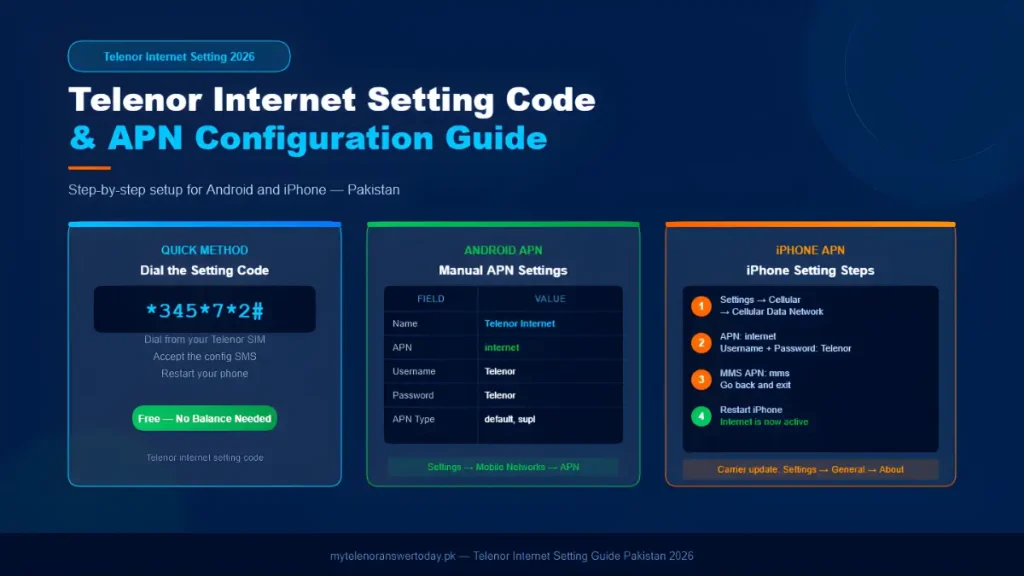
If that message never arrived, you can request it manually using the Telenor internet setting code: dial *345*7*2# from your Telenor SIM. A configuration SMS will be sent to your phone within minutes. Accept it, save, and restart. This is the quickest fix and works on most Android handsets.
Manual APN Telenor Internet Setting for Android
If auto-configuration didn’t work or you’re setting up a new device, follow these steps to configure Telenor net setting manually:
- Open Settings on your Android phone
- Go to Connections → Mobile Networks → Access Point Names
- Tap the “+” or “Add” button
- Enter the following details:
| Field | Value |
|---|---|
| Name | Telenor Internet |
| APN | internet |
| Username | Telenor |
| Password | Telenor |
| APN Type | default, supl |
| APN Protocol | IPv4/IPv6 |
- Save the settings and select this APN as your default
- Restart your phone
That’s the correct Telenor internet setting for 3G and 4G LTE on Android. Once you do this, your connection should be noticeably more stable and faster.
Telenor Internet Setting for iPhone
For iPhone users, the process is slightly different:
- Go to Settings → Cellular → Cellular Data Network
- Under Cellular Data, enter:
- APN: internet
- Username: Telenor
- Password: Telenor
- Scroll down to MMS and enter APN: mms
- Go back and restart your iPhone
If you can’t find the Cellular Data Network option, your carrier settings may need an update. Go to Settings → General → About and wait for a carrier update prompt.
Pro Tip: After applying the correct Telenor internet setting code or manual APN, always restart your phone. Many users skip this and wonder why the settings aren’t working.
Telenor Internet Setting Code – The One Shortcut You Need to Know
If your Telenor net setting ever stops working after a phone reset, SIM swap, or software update, just remember this one code:
Dial: *345*7*2#
This sends the official Telenor internet setting code directly to your device as a configuration message. It’s the same setting Telenor customer care sends when you call 345 – but faster, and free. Keep this saved somewhere because it genuinely comes in handy.
5 Real Telenor Free Internet Tricks That Work in 2026
Now that your settings are sorted, let’s talk about the actual ways to get Telenor free internet without spending a single rupee.
1. Daily Quiz in the My Telenor App – 150MB Every Day
This is the most consistent free data source available to every Telenor user right now, and it refreshes every single day.
Inside the My Telenor App, there’s a section called “Play & Win” where you answer five general knowledge questions. Get all five right, and you receive 150/500 MB of free internet instantly – no catch, no delay.
The quiz resets every midnight, which means you can claim this reward every 24 hours. That adds up to over 4.5GB of free data every month just from answering five questions daily. Students, freelancers, and everyday users across Pakistan are already doing this regularly.
To access it: open the My Telenor App → tap the green “Play & Win” button at the bottom-right → select “Test Your Skills” → answer all five questions correctly → claim your MBs.
Can’t figure out the answers? Visit mytelenoranswertoday.pk every day — we post verified answers daily right after midnight so you never miss your reward.
2. Telenor SIM Lagao Offer — 10GB Free for Inactive SIMs
If you have a Telenor SIM that you haven’t used for 30 days or more, you’re sitting on a goldmine. The SIM Lagao Reactivation Offer gives you 10,000 MBs (10GB) of free data plus 3,000 on-net minutes — valid for 60 days.
To activate it, simply dial *2222# or send an SMS with the word FREE to 2222. A minimal activation fee of Rs. 0.2 applies.
The 10GB is split into two portions: 5,000 MBs are credited immediately, and another 5,000 MBs arrive after 30 days. Data is usable between 12:00 AM and 7:00 PM, so plan your heavy downloads during those hours.
This is one of the most underused Telenor offers in Pakistan. If you have an old family SIM sitting in a drawer somewhere — dig it out, activate it, and enjoy weeks of free internet.
3. Telenor Free Internet VPN – What You Need to Know
A lot of users search for Telenor free internet VPN tricks hoping to bypass data charges through VPN tunneling. Let’s address this honestly.
Free VPN-based internet bypassing methods are generally unreliable, slow, and against Telenor’s terms of service. They often stop working after a few days when Telenor patches the loophole, and some can compromise your security by routing your data through untrustworthy servers.
However, a legitimate use of VPN alongside Telenor free net is to protect your privacy while using the free MBs you’ve already earned through the quiz or SIM Lagao. If you’re on public Wi-Fi or sharing data, a trusted VPN like ProtonVPN (free version) keeps your browsing private. That’s the smart approach.
The bottom line: don’t chase risky Telenor free internet VPN shortcuts. The official methods listed in this guide already give you a significant amount of free data — use those.
4. Telenor Free MB Codes – Official Promotional Offers
Telenor Pakistan regularly runs promotional campaigns where users can claim free MBs through specific codes. These change periodically, but here are the most consistent ones to check:
Always check the My Telenor App under the “Offers” tab as well — personalized free data offers based on your usage history appear there frequently. Users who use data regularly tend to receive more targeted promotions.
5. Telenor Ramadan, Eid & Seasonal Bonus MBs
Telenor Pakistan launches special free internet promotions during Ramadan, Eid ul-Fitr, Eid ul-Adha, Independence Day (14 August), and other national occasions. During these periods, even the daily quiz reward sometimes jumps from 150MB to 500MB.
The trick here is simple: stay active on the My Telenor App during these seasons. Check the “Play & Win” section, the “Offers” tab, and the app’s notifications regularly. Seasonal bonuses are often time-limited and expire quickly if unclaimed.
Want to check your balance, MBs, or minutes instantly? Visit our complete Telenor Codes guide for all official USSD codes in one place.
How to Check Your Telenor Net Setting Is Working Correctly
After applying your Telenor internet setting, you can verify it’s active and working:
- Open your browser and visit any website — if it loads, your APN is configured correctly
- Dial *444# to check your current data balance and see that MBs are being deducted (not balance)
- Go to Settings → Connections → Mobile Networks and confirm your selected APN is “Telenor Internet”
If pages are loading but slowly, try switching between 4G and 3G in your network mode settings. Sometimes forcing 4G-only improves speed significantly in urban areas.
Common Telenor Internet Problems and Quick Fixes
Even with the right Telenor net setting, you might occasionally face issues. Here are the most common ones and how to fix them fast:
Internet not working after SIM swap: Request a fresh configuration using the Telenor internet setting code *345*7*2# and restart your phone.
Slow 4G speeds: Go to Settings → Mobile Networks → Network Mode → and select “LTE/4G only.” This forces your phone to stay on the fastest available signal.
Data balance deducting even with a bundle: Check if your APN is set correctly. If the APN is wrong, data charges fall on your main balance instead of your bundle. Fix the Telenor internet setting as described above.
My Telenor App not loading the quiz: Clear the app cache from Settings → Apps → My Telenor → Storage → Clear Cache. Then reopen and try again.
Stay ahead with the latest offers and network news — check our Telenor Updates section for real-time changes to packages, promotions, and app features.
Final Words – Your Free Internet Game Plan for 2026
Let’s put it all together. Here’s your simple daily and monthly routine for maximum free internet on Telenor:
Every day: Open the My Telenor App, go to Play & Win, check mytelenoranswertoday.pk for correct Telenor Quiz Today answers, and claim your 150MB reward.
Once (if eligible): Activate the SIM Lagao Offer on any dormant Telenor SIM for 10GB free data over 60 days.
Monthly: Check the Offers tab in the My Telenor App for personalized data promotions. Watch for seasonal campaigns during Ramadan, Eid, and other holidays.
Once (and keep saved): Apply the correct Telenor internet setting using the Telenor internet setting code *345*7*2# so your data always runs at full speed.
None of these methods require hacks or risky tools. They’re all official, all legitimate, and all available to every Telenor user in Pakistan right now. The only thing you need is consistency and a bookmark on this page.
Stay connected smartly. 💙
This article is published for informational and educational purposes. mytelenoranswertoday.pk is an independent platform and is not affiliated with or endorsed by Telenor Pakistan.


